Model Trading Guide
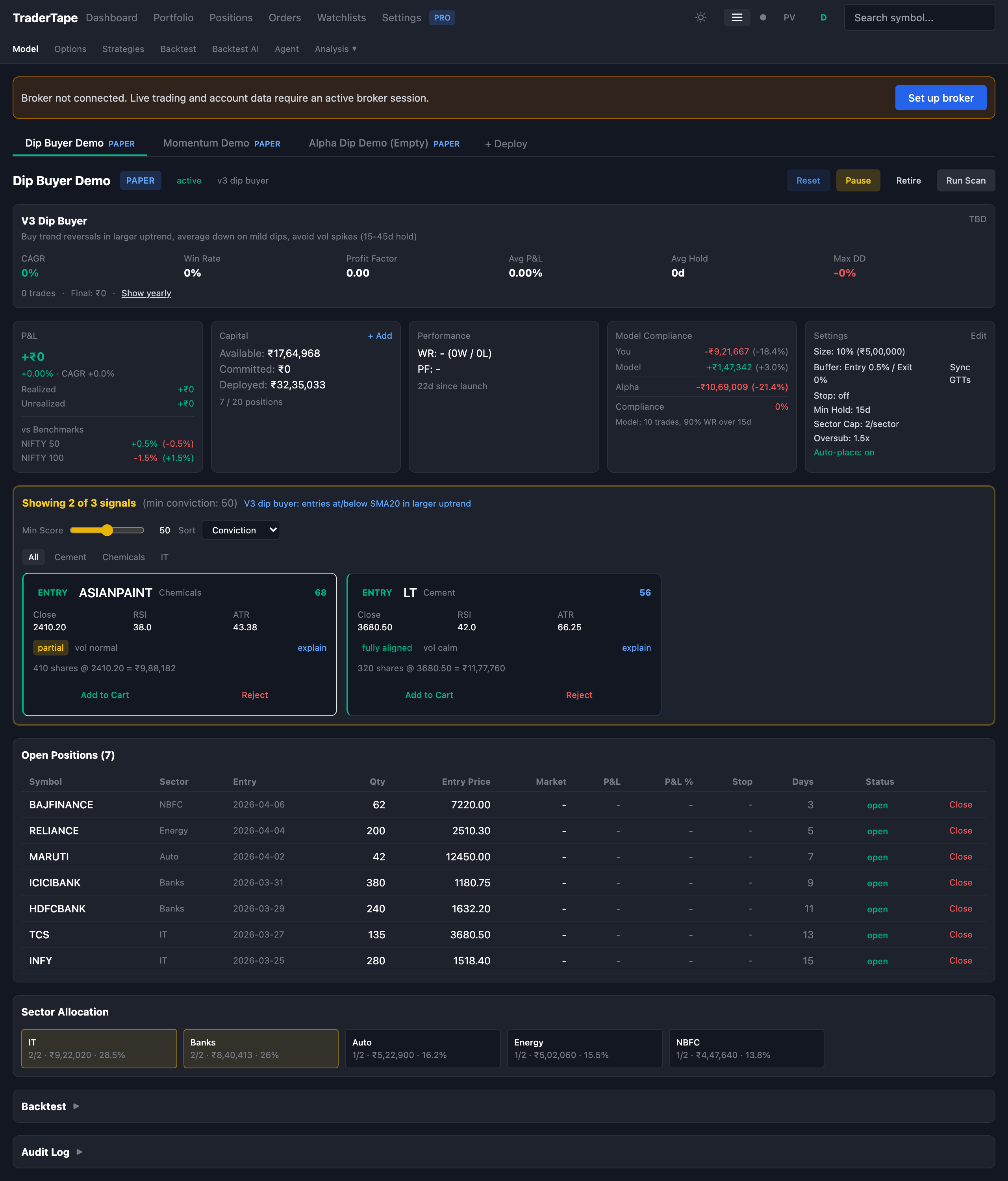
The Model Trading system is the heart of TraderTape. You allocate capital to a strategy, the scanner runs daily to find matching trades, signals get queued for approval (or auto-executed), and live positions are tracked end-to-end with reconciliation against your broker.
Each portfolio is tied to one broker (Kite, Upstox, or Groww). All cloud-driven execution uses GTT orders only — no immediate market orders through the cloud. GTT placement is exempt from SEBI's static-IP requirement, so you don't need a registered static IP to trade.
This guide walks the entire lifecycle: deploy → scan → approve → execute → monitor → exit.
Concepts
Portfolio
A ModelPortfolio is one strategy + one capital allocation + one set of guardrails. You can have many portfolios per account, each running a different strategy or different capital.
Key fields:
starting_capital— what you started withcurrent_capital— free cash, available for new positionsdeployed_capital— value of open positions at entry costcommitted_capital— value of pending GTTs (not yet filled)position_size— how much to allocate per trade (recomputed fromposition_size_pctof total capital)max_positions— hard cap on concurrent open positionsmax_per_sector— hard cap on concurrent positions in any one sectormax_oversubscription— multiplier for committed + deployed vs total capital (lets you queue more GTTs than capital strictly allows, for the case where some inevitably won't trigger)min_hold_days— strategy-level minimum hold before any exit can fire (intraday stops still apply if configured)atr_stop_multiplier— N × ATR(14) below entry as a stop. Set to 0 to disable.auto_place_signals— if true, signals skip manual approval and become GTTs immediatelypaper_mode— if true, signals fill virtually at the close price; no broker calls
Signal
A ModelSignal is one trade idea generated by the scanner. Lifecycle:
pending_approval → in_cart → approved → executed
                     ↓                       ↓
                  rejected                failed
                     ↓
                  expired
pending_approval— scanner generated it, waiting for human or auto-placein_cart— moved to "the cart" (an explicit batch of intended trades)approved— GTT placed on the broker, waiting for triggerexecuted— broker confirmed fill (or paper executor filled it virtually)failed— GTT triggered but order was rejected (margin, tick size, etc.)rejected— user explicitly clicked Rejectexpired— entry conditions no longer hold (re-validation runs each scan)no_capital— would fit the strategy but portfolio doesn't have free capital
Position
A ModelPosition is one open trade. Lifecycle:
pending_entry → open → closed
                  ↓
              cancelled
pending_entry— entry GTT placed, waiting for fillopen— fill confirmed, position is liveclosed— exit GTT filled or manual close — hasrealized_pnlandexit_reasoncancelled— entry GTT was cancelled before filling
For paper portfolios, positions go straight from creation to open (no pending_entry step) because the virtual fill happens at scan time.
1. Deploy a portfolio
In the Model Trading page, click + Deploy (or one of the empty-state cards if it's your first portfolio).
The deploy modal asks you to pick:
Mode:
- Live — real money, real broker, real GTTs
- Paper — virtual money, no broker, instant fills
Strategy:
- A built-in model (V1 Momentum, V3 Dip Buyer, V4 Alpha Dip, etc.) — see Built-in Models
- A custom DSL strategy you've created — see Strategies guide
Capital:
starting_capital— total budgetposition_size_pct— % of total per trade (default 10%)max_positions,max_per_sector,max_oversubscription
Auto-place — unchecked by default. If checked, every scan-generated signal becomes an in-cart and the system attempts to place GTTs immediately. Useful when you trust the strategy and want hands-off operation. For paper portfolios, this is automatically on (since manual approval makes no sense without real risk).
Click Deploy. The portfolio appears in the tab bar at the top of the Model page.
2. The scan
Scans happen automatically once a day post-market (around 15:35 IST). You can also manually trigger one anytime via the Run Scan button on the portfolio header.
What a scan does:
- Refreshes daily candles for the universe (NIFTY 100 by default). If candles are stale or missing, it backfills from Kite (or Yahoo Finance if no Kite session).
- Re-validates approved GTTs — if a stock no longer meets the entry conditions, the GTT is cancelled and the signal is marked
expired. - Generates entry signals — runs the strategy DSL against every stock in the universe. Stocks that pass become
pending_approvalsignals. - Generates exit signals — checks every open position against the strategy's exit rules. Hits become
pending_approvalexits. - Generates add-on signals — if the strategy supports averaging down (e.g. V3 Dip Buyer), checks open positions for add-on conditions.
- Conviction scoring — every entry signal gets a 0–100 conviction score. See Conviction Scoring.
- Auto-place handling — if the portfolio has
auto_place_signals = true, signals immediately move toin_cartand GTTs are attempted. - Telegram notification — if the bot is configured, sends a summary of new signals.
The scan duration is typically 5–30 seconds depending on candle freshness. The audit log records every scan with the signal counts.
3. Reviewing signals
After a scan, the dashboard shows three sections:
- Pending Approval — signals waiting for your review
- Cart — signals you've moved to the cart but not yet placed
- Open Positions — currently held trades
For each pending signal you'll see:
- Symbol, sector, suggested qty, suggested price
- Conviction score (0–100) and the breakdown of how it was computed
- Indicator snapshot (RSI, SMA, ATR, vol regime, trend alignment) at the moment of scan
- Why it fired — which DSL conditions matched
- Approve / Reject / Explain buttons
Click Approve to move it to the cart. Reject to mark it rejected. Explain to see the strategy rules that matched.
The conviction score helps you choose when more signals fired than you have capital for. The default ordering is descending by conviction. You can also filter by minimum conviction, sort by RSI, sector, or symbol, and group by sector.
Cart workflow
The cart is "the batch of trades I intend to place this scan". You add signals to it via Approve, optionally tweak the trigger buffer per signal, then click Place Cart to send GTTs to your broker in one batch.
The cart respects all the portfolio constraints:
- Sector cap is checked per add — adding a 3rd signal in a sector that's already got 2 will fail with an error
- Oversubscription limit is checked per add — committed + deployed cannot exceed
max_oversubscription × total_capital - Capital availability is a soft check — you can place GTTs that exceed
current_capital(they'll fail at trigger time if no margin), but the warning is displayed
4. GTT placement
When a signal is placed, TraderTape creates a Kite GTT (Good Till Triggered) order:
- Trigger price =
signal.close_price × (1 - entry_premium_pct/100)for entries (you want to buy on a dip from the signal close) - Limit price = same as trigger price (limit order, not market)
- Quantity =
signal.suggested_qty - Product = CNC (delivery)
Once placed, the signal moves to approved and the corresponding ModelPosition is created with status pending_entry.
The trigger buffer (entry_premium_pct, default 0.5%) gives you a small price improvement vs the signal close. You can adjust it portfolio-wide (Settings tab inside the portfolio detail) or per-signal in the cart.
5. Fill detection
A background fill monitor runs every 60 seconds during market hours. For each pending-entry position with a GTT:
- Fetch the GTT status from the broker
- If
triggered, find the resulting order - Check the order status:
COMPLETE,OPEN,REJECTED, etc. - If
COMPLETE, mark the positionopen, updateentry_priceto the actual fill price, place the stop-loss GTT (ifatr_stop_multiplier > 0), and send a Telegram notification
This monitor also handles exits: if an exit GTT or stop GTT triggers, the position closes, P&L is computed, the audit log records position_closed, and capital flows back into current_capital.
6. Stop losses
If your strategy has atr_stop_multiplier > 0, the system places a stop-loss GTT after every successful entry fill:
- Stop price =
entry_price - multiplier × ATR(14)_at_entry - Order type = SELL LIMIT at the stop price
- Persists across days — unlike SL-M intraday orders, GTTs survive end-of-day
The stop is not trailing. It's set once at entry and only changes when an add-on entry fires (which recomputes the stop based on the new average entry price).
If you set atr_stop_multiplier = 0 (the default for V3 / V4), no stop is placed. The strategy's exit rules become your only loss-control mechanism. The backtest data shows this trade-off explicitly: more flexibility, larger worst single-trade drawdown, but better aggregate alpha.
7. Exits
Exits come from two places:
Strategy exit rules — the DSL evaluates each open position every scan. If any exit rule matches, an exit signal is generated. After the min_hold_days constraint, the exit GTT is placed (or executed manually).
Stop-loss GTT — the per-position GTT placed at entry. If price hits the stop, the position closes via this GTT.
When either fires, the fill monitor detects the trigger, fetches the actual fill, and:
- Sets
pos.status = "closed",exit_price,exit_qty,exit_value,exit_reason - Computes
realized_pnl = (exit_price - avg_entry) × total_qty - Decrements
deployed_capital, incrementscurrent_capital - Records audit events
exit_filledandposition_closed - Auto-resumes any paused GTTs that were waiting on freed capital
8. Add-ons (averaging down)
Strategies like V3 Dip Buyer support add-ons: if an open position dips further into oversold territory, the system fires an add_on signal that buys more at a lower price, then recomputes the average entry.
Add-on rules in the DSL define:
min_dip_pct— how far below avg_entry the price must dropmax_dip_pct— too-deep dips are excluded (avoid catching falling knives)min_days_between— minimum bars since the last entrymax_adds— total number of add-ons allowed (so V3 withmax_adds=2allows up to 3 entries: original + 2 add-ons)- DSL conditions on indicators (e.g. RSI must be even more oversold than entry)
Each add-on:
- Creates a new entry GTT (or paper fill)
- On fill, updates
pos.total_qty,pos.total_invested, andpos.avg_entry_price - Recomputes the stop-loss GTT based on the new average entry price
- Resets
pos.last_entry_date(so themin_hold_daysclock restarts from the most recent entry)
Add-ons are tracked separately in the audit log with entry_number, so you can trace the exact P&L contribution of each leg.
9. Manual interventions
You can intervene at any point in the lifecycle:
- Cancel a GTT before it triggers — cancels the broker GTT, marks the signal
expired, releases committed capital - Manually close a position — places a market SELL through the broker, closes the position with reason
manual - Pause the portfolio —
auto_place_signalsis disabled and no new scans run, but existing positions and GTTs continue - Retire the portfolio — only allowed if there are no open positions; freezes the portfolio for audit purposes
- Reset (paper only) — closes all open positions at entry price (zero P&L) and restores starting capital
All manual actions are recorded in the audit log with timestamps and your user_id.
10. The dashboard view
The portfolio dashboard shows:
- Header — name, status badge, model type, broker (or PAPER badge), Pause/Reset/Run Scan buttons
- Portfolio stats — current_capital, deployed_capital, committed_capital, total value, since-deploy return
- P&L breakdown — realized (closed positions) + unrealized (open at current LTP)
- CAGR vs benchmark — your annualized return vs NIFTY 50 / NIFTY 500 over the same period
- Backtest comparison — the strategy's historical metrics for context
- Sector allocation — pie chart of open positions by sector
- Open positions table — symbol, qty, avg entry, LTP, unrealized P&L, days held, stop distance
- Pending signals — entry / exit / add-on, sortable by conviction
- Cart — signals you've approved but not yet placed
- Recently closed — last 10 closed positions with realized P&L
- Audit log — scan history, fills, manual actions
11. Compliance view
The Compliance tab compares your actual portfolio performance against a perfect-execution backtest. It runs the strategy from your portfolio's first entry date to today and computes the gap.
A negative gap usually means:
- You didn't approve some signals the model wanted
- You manually closed positions early
- Real fills were worse than the close price the backtest used
- Stop-loss GTTs got triggered by intraday wicks the backtest doesn't see
A positive gap means you got lucky on slippage or made good manual calls. Either way, the gap is the most useful "am I executing the model faithfully?" metric.
Common patterns
"I deployed but nothing happens"
- Check the portfolio is
active, notpaused - Run a manual scan via the Run Scan button
- Check the entry conditions of your strategy — V3 / V4 are very selective and may go days without firing
- Check that you have daily candle data for the universe (Settings → Data Coverage)
"Signals fire but capital says I can't place them"
- Check
current_capital— if positions are using all of it, new entries getno_capitalstatus - Check
committed_capital— pending GTTs reserve their value too - The oversubscription limit lets you queue beyond available capital, but only by
max_oversubscription × total_capital(default 1.5x) - Sector caps may also be blocking — check
Max Per Sectoragainst your existing exposure
"Some signals are flagged 'invalidated'"
The re-validation step on every scan re-checks each approved GTT against the current entry conditions. If RSI has moved out of range, or the trend has flipped, the GTT is cancelled and the signal is marked expired with reason pause_reason. This is intentional — it prevents stale GTTs from filling on conditions that no longer match the strategy.
"I want to A/B test two strategies"
Deploy two paper portfolios with the same starting capital but different strategies. Watch them run for a few weeks. The Compliance tab gives you a clean apples-to-apples comparison of how each model would have performed on the same days.
Next
- Strategies Guide — build your own DSL strategy
- Backtesting Guide — validate before you deploy
- Conviction Scoring — what the 0–100 score actually means
- Risk Rules — hard limits that override the strategy
- Reconciliation — how to catch drift between cloud and broker