Connect a broker
TraderTape supports four brokers today: Zerodha Kite, Upstox, Groww, and ICICI Direct. Connecting a broker unlocks the Wealth product (live holdings, positions, orders, day P&L) and lets Strategy portfolios execute live orders through your broker session.
Paper portfolios don't need a broker. Neither does Journal (uses uploaded tradebooks). So only connect one when you're ready to trade real money — or when you want live portfolio data.
1. Save your API credentials
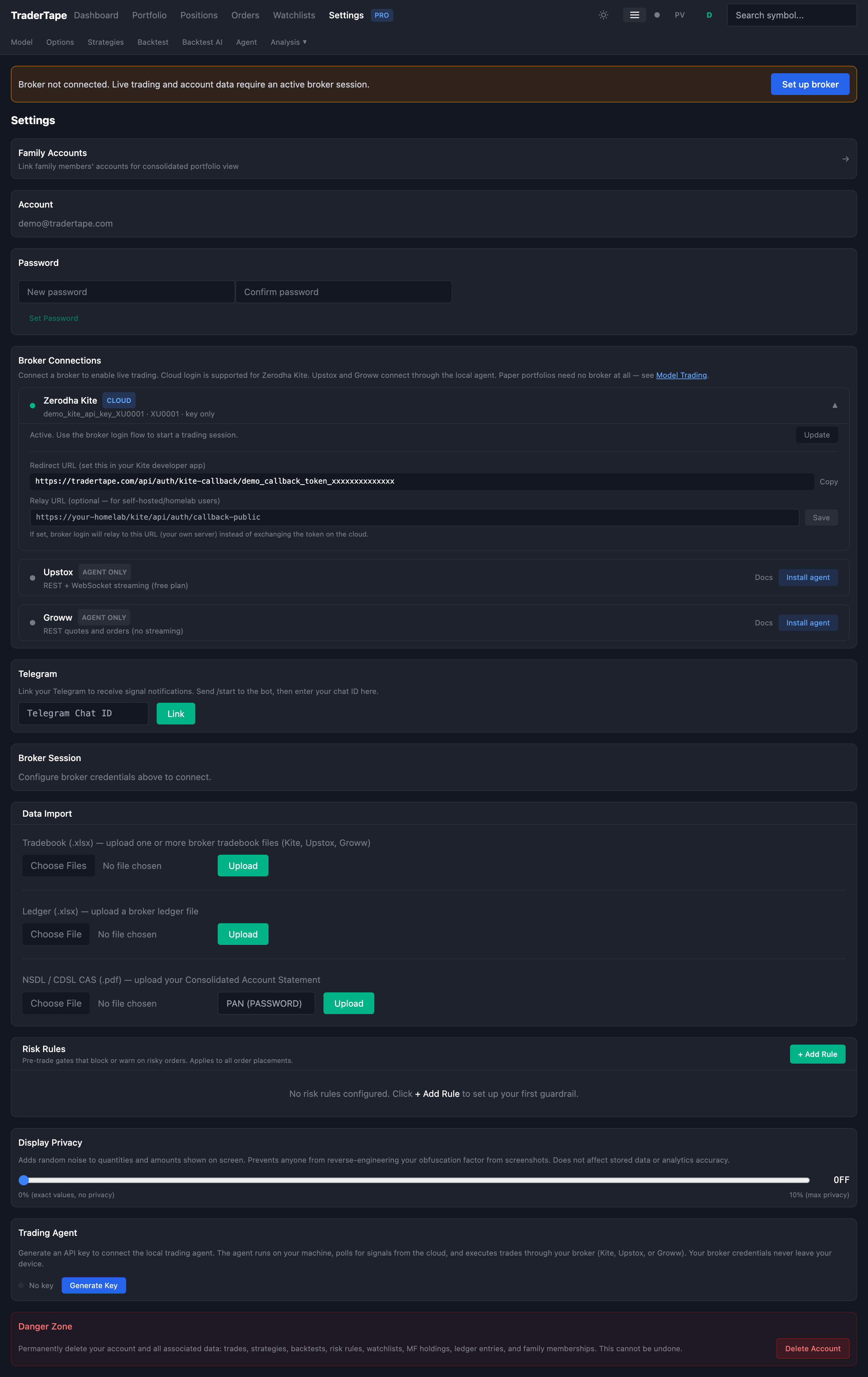
Open Settings (gear icon, top-right of the app) and scroll to Broker Connections. Expand the broker you want to connect.
You'll need two things from your broker's developer portal:
- API key — public identifier for your app
- API secret — the thing that proves it's you
Each broker has a slightly different flow for generating these. Every broker card links to its developer portal and lists the redirect URL you need to register there.
Kite: developers.kite.trade → create app → paste the per-user redirect URL from the Kite card in Settings.
Upstox: account.upstox.com/developer/apps → register https://tradertape.com/api/broker-proxy/upstox/callback.
Groww: Groww API portal → enable TOTP → your "secret" is the TOTP base32 string.
ICICI Direct: Breeze API portal → register with static IP 13.201.56.42.
Paste the API key into TraderTape. The API secret is optional here — see the toggle below.
2. The save-to-cloud toggle
Under the API secret field on every broker card there's a checkbox:
Save secret to cloud for one-click login
This is the heart of TraderTape's privacy model. Two modes:
Unchecked (default): Your API secret never reaches our servers. You paste it each time you log in to the broker. Your password manager handles the daily ritual. For Kite/Upstox/Groww, TraderTape computes a one-way cryptographic checksum locally and only sends that to the broker's token endpoint. This mode is sometimes called the "browser thin client" flow.
Checked: Your encrypted API secret is stored on cloud. Future logins are one-click — no paste required. This requires admin/family approval (see below).
For ICICI Direct, the toggle is locked-on — their API requires a per-call checksum that can only be computed server-side with the secret, so there's no browser-side option.
Who can check the box?
Per SEBI's algo trading rules, only admin and family-shared accounts can store API secrets on shared cloud infrastructure. For everyone else, the toggle is visible but disabled with a tooltip explaining why.
Why? SEBI requires algo traders to use a static IP. Family members on the same IP are allowed to share that IP legally — that's the carve-out for family. Other retail users on the same cloud IP would violate the rule, so TraderTape enforces it in software: the toggle is only enabled when allow_cloud_credentials is granted by an admin.
Everyone else uses the browser-thin-client flow, which keeps the secret on your device.
3. Broker login
Once your API key is saved (and optionally your secret toggled), click the broker icon in the top-right toolbar. A dropdown shows all configured brokers with their current session status:
- Green dot — logged in, session valid
- Red dot — previously logged in, session expired (Kite sessions expire daily around 06:00 IST)
- Grey dot — never logged in
Click Login next to any broker. What happens next depends on how many brokers you have configured:
- One broker configured — goes straight into that broker's login modal (fast path)
- Two or more configured — shows a picker first ("Which broker?")
- None configured — redirects to Settings
The login modal opens a new tab to the broker's OAuth page. Complete the broker's login + MFA normally. When the broker redirects back, TraderTape captures the request token, computes the checksum locally (if browser-thin-client) or exchanges it server-side (if cloud-saved), and your session is live.
4. Verify
Back in the app, open Wealth → Dashboard. If the connection is live, you'll see your holdings, positions, day P&L, and margin data.
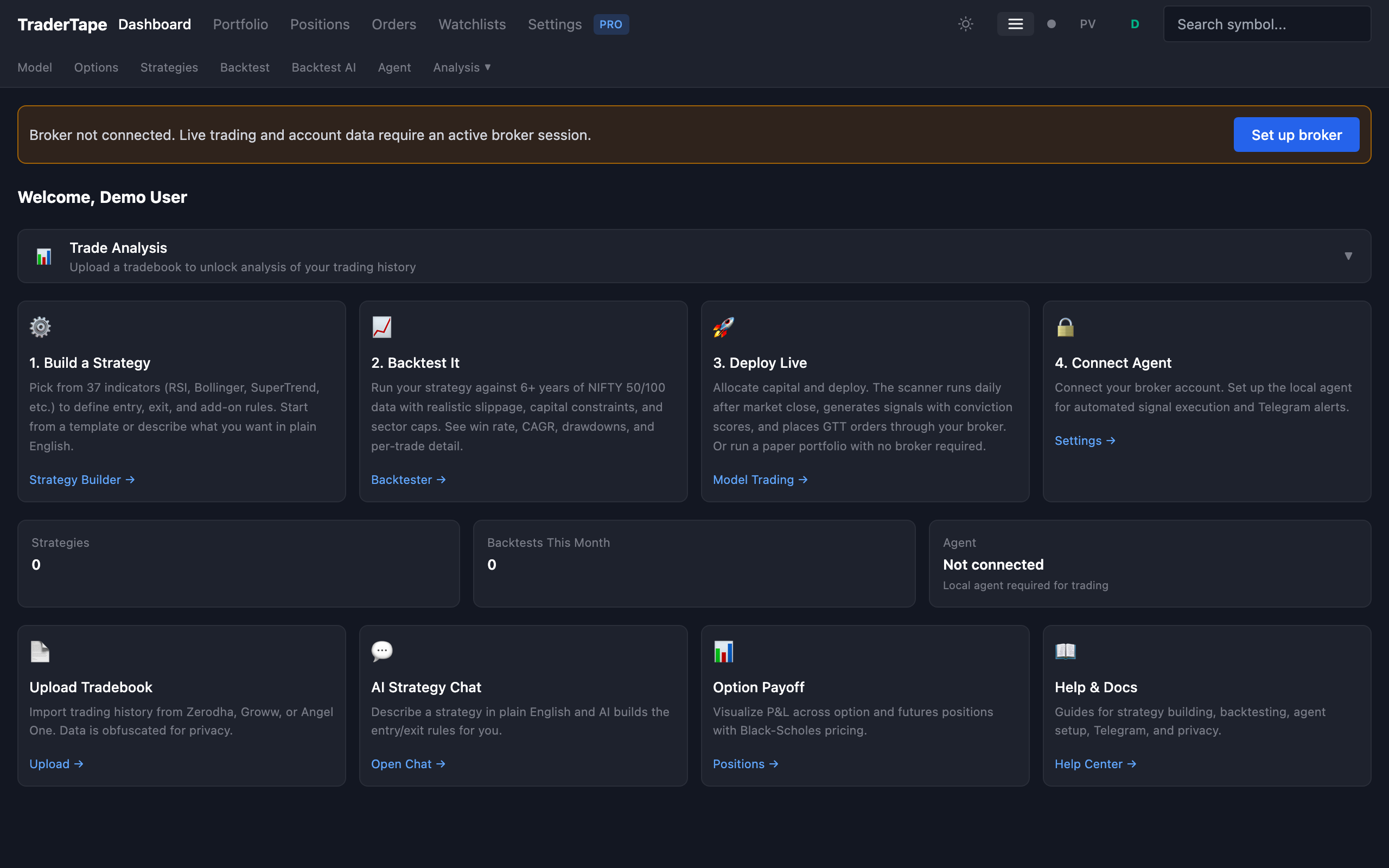
If you see "No broker connected" with a Broker login button, something went wrong. Click the button and check:
- API key saved correctly in Settings?
- Redirect URL registered correctly on the broker's dev portal?
- Browser didn't block the popup?
- For Kite: session expired (they reset daily at 06:00 IST)?
5. Daily re-login
Broker sessions expire. For Kite, that's every morning at 06:00 IST. For others, the lifetime varies (typically 8-12 hours).
When your session expires:
- Wealth pages show a "No broker connected" banner — click Broker login to re-authenticate
- Strategy portfolios with auto-place enabled queue signals until you log back in
- The broker icon in the top toolbar shows a red dot
Password managers autofill the API secret field on the login modal, so the daily ritual is just: click broker icon → click Login → Enter → done. ~5 seconds.
Troubleshooting
"Save to cloud" toggle is disabled.
You don't have allow_cloud_credentials permission. Either use browser login (paste secret each time) or ask an admin to grant the permission.
Kite login succeeds but dashboard is empty. Kite's free tier doesn't include live ticks. Prices refresh every 10-15 seconds via REST polling instead. All features work except the real-time ticker dot in the toolbar.
Broker redirect URL mismatch. Check that the URL registered on your broker's dev portal exactly matches the one shown in the broker card in Settings. Kite uses per-user URLs (each user has a unique callback token). Upstox/Groww use a shared one.
"No broker connected" banner stays after successful login. The frontend caches session state. Hard refresh (Cmd+Shift+R) should clear it.
Next → Strategy overview